
How to Buy and Set Up a Japan eSIM: Step-by-Step Guide
This site may contain affiliate links. If you buy or sign up through one, we may earn a commission at no extra cost to you. It never changes our verdict. Details
This guide contains an affiliate link for Sakura Mobile. We have an affiliate partnership with Sakura Mobile; buying through our link supports the site at no extra cost to you. We have no partnership with Airalo, Japan Wireless, eConnect Japan, or IIJmio. For a full comparison of all four providers — prices, tethering, and backup guarantees verified August 30, 2026 — see our Japan eSIM comparison.
Quick answer: If you want to install before departure and have a backup for unexpected device incompatibility, choose Sakura Mobile's Unlimited 5G plan; its usage period starts on arrival in Japan, while its 3 GB/day plan must be installed after arrival.sm1sm_setup If you want a backup for a compatible device that still cannot connect after support-guided troubleshooting in Japan, choose Japan Wireless and activate in Japan.jw3jw_timing If you need confirmed 24/7 live support, choose Airalo, install with a stable connection, and do not delete the eSIM because it cannot be reinstalled.al_contactal_installal_delete If you are considering eConnect Japan, confirm installation timing and support arrangements directly before buying; its FAQ has no eSIM-specific troubleshooting guidance.
Key facts
- Best for installation before departure with an incompatibility backup: Sakura Mobile Unlimited 5G.sm1
- Best for a backup after unresolved connection trouble on a compatible device: Japan Wireless, after arrival and support-guided troubleshooting.jw3
- 24/7 live support confirmed: Airalo.al_contact
- Install only after arrival: Sakura Mobile 3 GB/day; counting starts immediately on installation.sm_setup
- Setup and support checked: 2026-09-03.
- Prices checked: 2026-08-30 in the Japan eSIM comparison referenced above.
Which one, at a glance
| Best for | Recommendation | Why |
|---|---|---|
| Installing before departure with a device-incompatibility backup | Sakura Mobile Unlimited 5G | Usage starts on arrival in Japan; unexpected incompatibility qualifies for a pocket WiFi upgrade at no extra cost.sm1 |
| A backup when a compatible device cannot connect | Japan Wireless | Free pocket WiFi shipped to accommodation in Japan if support-guided troubleshooting after arrival cannot resolve the issue on a compatible device.jw3 |
| Late-night connection problems | Airalo | Confirmed 24/7 live support.al_contact |
| Considering eConnect Japan | Confirm timing and support directly before buying | Installation timing is unconfirmed, and the FAQ has no eSIM-specific troubleshooting guidance. |
Sources: Sakura Mobile Travel eSIM pagesm1, Japan Wireless Backup Guaranteejw3, Airalo contact pageal_contact, eConnect Japan FAQ. Checked 2026-09-03.
View Sakura Mobile home page (affiliate link) →View Airalo official site →View Japan Wireless official plan →View eConnect Japan official page →
Installing a Japan eSIM at the wrong time can waste a full day of your data before your flight lands — and the timing rule is different for every provider. Sakura Mobile's 3 GB/day plan starts counting from the moment you install it, not from when you arrive in Japan; Japan Wireless's validity period begins the moment you activate, regardless of where you are when you do.
Already in Japan and can't connect? Jump to troubleshooting steps or support hours.
Not sure which Japan eSIM to buy yet? Start with the comparison — Sakura Mobile, Airalo, Japan Wireless, and eConnect Japan, with prices verified August 30, 2026 — at Best eSIM for Tourists Visiting Japan.
Before You Buy: Confirm Your Phone First
Buying an eSIM before checking device compatibility is the most common cause of a failed installation.
Check eSIM support: On iPhone, go to Settings → General → About → Available SIMs. On most Android phones, go to Settings → Network or Connections → SIM Management. If an eSIM option appears, your phone supports it. If not, a pocket WiFi or an airport SIM may be your only option — see [/articles/japan-wifi-esim-sim-choice/].
Check carrier lock: On iPhone, go to Settings → General → About → Carrier Lock. "No SIM restrictions" means the phone is unlocked. A carrier-locked phone may reject third-party eSIMs; contact your home carrier before purchasing.
How to Buy a Japan eSIM from Outside Japan
All four products are sold online and delivered as a QR code by email or app — no physical shipping, no shipping fees. Your phone must be unlocked and eSIM-compatible; confirm this before purchasing, as not all carrier-locked handsets accept third-party eSIMs.
Buying Sakura Mobile from outside Japan:
- If Sakura Mobile's eSIM turns out to be incompatible with your device after purchase, they will immediately upgrade you to a pocket WiFi at no extra cost — this guarantee covers device-incompatibility cases specifically. Contact their support as soon as you identify the issue. Go to sakuramobile.jp — affiliate link, opens their home page — and navigate to the Travel eSIM section.
- Choose between the Unlimited 5G (au network) and 3 GB/day (docomo network) plan types.
- Enter your planned Japan arrival and departure dates; the price for your specific period will appear.
- Complete checkout using a card issued outside Japan; accepted brands are listed at sakuramobile.jp/info/payment/. Payment is processed in Japanese yen.
- After purchase, you receive an email with a link to your QR code. Installation takes approximately five minutes. The 3 GB/day and Unlimited 5G plans have different installation timing rules — see the section below.
These steps don't apply if: your phone is not eSIM-compatible — confirm compatibility using the Before You Buy section above before purchasing. If incompatibility surfaces after purchase, the free pocket WiFi upgrade in Step 1 applies.
Buying Airalo from outside Japan:
Purchase through the Airalo website or app. Select Japan, choose a plan period, and pay. You will receive a QR code in the app or by email.
Before you start: Once you have added the Airalo eSIM to your phone, do not delete it — reinstallation after deletion is not possible.al_delete These steps also require a stable internet connection; if you land without connectivity, find one — airport Wi-Fi, for example — before you install.
Buying Japan Wireless from outside Japan:
Go to japan-wireless.com/esim and select a plan. Payment options include credit card, PayPal, Google Pay, and Apple Pay. The promotional discount applies at checkout — no code required.
These steps don't apply if: your device is not eSIM-compatible. Japan Wireless's backup guarantee covers compatible devices that fail to connect — it does not cover incompatible hardware. If you encounter connection trouble after following the standard steps, see the troubleshooting section below.
Buying eConnect Japan from outside Japan:
Purchase through econnectjapan.com. The eSIM is delivered by email; no Japan address is required. Confirm with the company that international purchasing is supported before checking out, as the product page does not state this explicitly.
Note: eConnect Japan does not publish eSIM-specific troubleshooting guidance in their FAQ. If you experience a connection problem, your only documented option is their contact form. If reliable troubleshooting support matters to you, one of the other three providers will be better placed to help.
Because all four products are digital, there are no customs or import considerations. Sakura Mobile delivers the QR code by email after purchase. You can also collect the QR code at the airport counter — show your passport at the Sakura Mobile counter on arrival.sm_pickup
When to Install: Timing Rules That Protect Your Plan
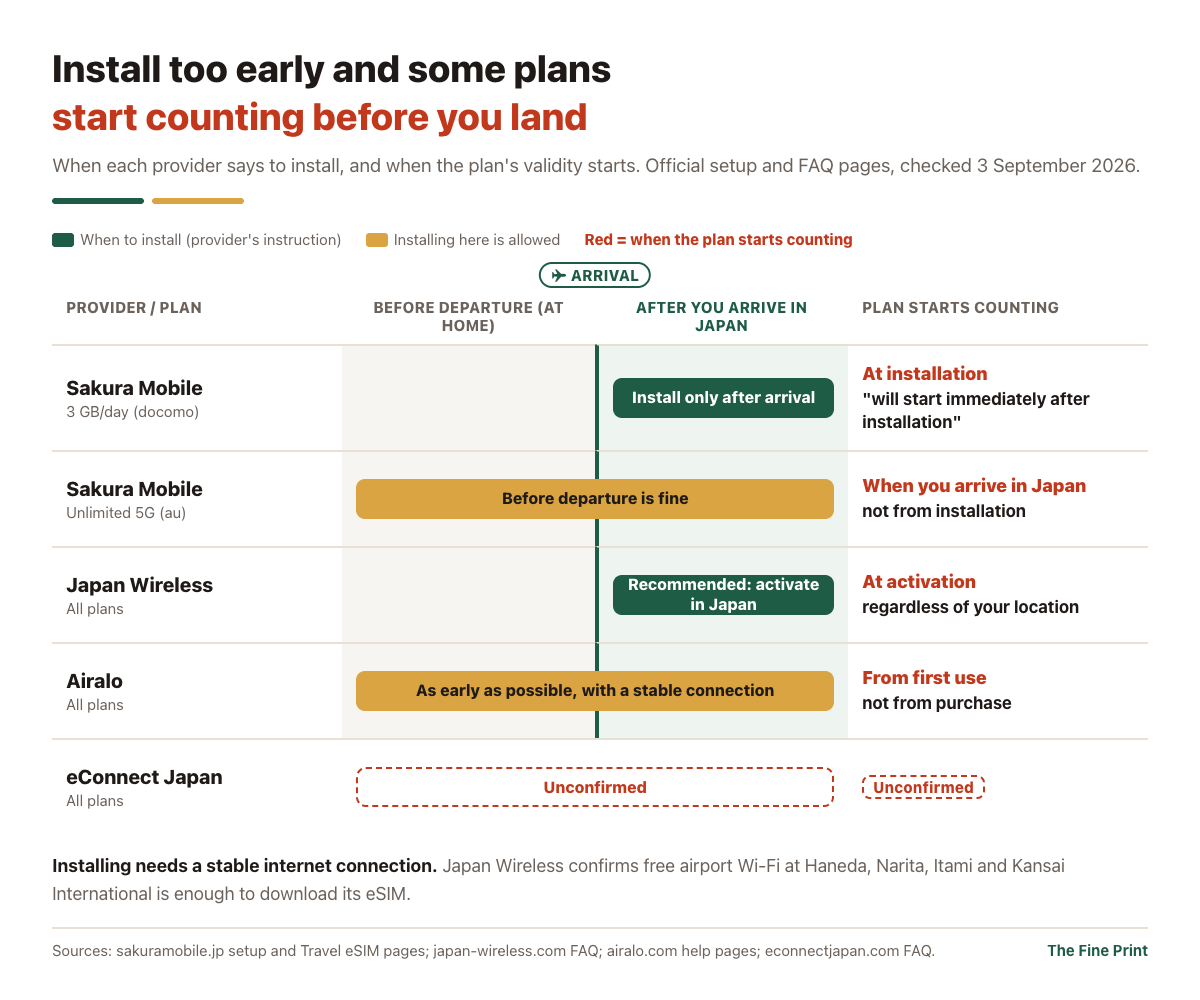
The biggest preventable mistake with a Japan eSIM is installing at the wrong time. Each provider counts the validity period differently, and getting this wrong can waste a day or more of data before your trip begins.
| Provider | Plan | When to install | When the plan starts counting |
|---|---|---|---|
| Sakura Mobile | 3 GB/day (docomo) | After you arrive in Japan | From the moment of installationsm_setup |
| Sakura Mobile | Unlimited 5G (au) | Before departure is fine | From when you arrive in Japan — not from installationsm1 |
| Japan Wireless | All plans | Recommended: in Japan | From the moment the eSIM is activated, regardless of your locationjw_timing |
| Airalo | All plans | As early as possible, whenever you have a stable connection | From first use — not from purchaseal_buy |
| eConnect Japan | All plans | Not confirmed from official pages | Not confirmed from official pages |
Sources: Sakura Mobile setup and Travel eSIM pagessm_setupsm1, Japan Wireless activation FAQjw_timing, Airalo purchase and installation help pagesal_buyal_install, eConnect Japan FAQ. Checked 2026-09-03.
These rules are drawn from each provider's official setup and FAQ pages, verified September 3, 2026:
- Sakura Mobile 3 GB/day: "The 3GB/day data plan will start immediately after installation. Please install the eSIM only after you arrive in Japan." (sakuramobile.jp/info/setting/travel-esim/)sm_setup
- Sakura Mobile Unlimited 5G: "You can install eSIM in advance from your country of departure" and "For 5G eSIM the usage period starts once you arrive to Japan." (sakuramobile.jp/travel/esim/)sm1
- Japan Wireless: "Please activate your eSIM in Japan since the validity period starts once your eSIM is activated regardless of your location." (japan-wireless.com FAQ)jw_timing
- Airalo: "You can buy your eSIM before your trip. The validity period doesn't start when you buy it."al_buy Install timing: "As early as possible, whenever you have a stable internet connection."al_install (airalo.com help pages)
Do Not Delete Your Airalo eSIM
Airalo's official support page states: "Please note that in case the eSIM has been removed and you attempt to reinstall it, it will not be possible!"al_delete Deleting the Airalo eSIM profile from your device is permanent — you cannot reinstall it. Do not remove the Airalo eSIM until your trip is fully over.
Installing the QR Code: You Will Need a Stable Connection
Scanning the QR code requires a stable internet connection. Keep this in mind if you plan to install after landing in Japan.
- Sakura Mobile states: "A stable internet connection is required to install the eSIM."sm_setup (sakuramobile.jp/info/setting/travel-esim/, verified 2026-09-03)
- Japan Wireless explicitly confirms that airport Wi-Fi is sufficient: "Airports such as Haneda, Narita, Itami and Kansai International provides free wifi access so you'll be able to download your Japan Wireless eSIM there."jw_timing (japan-wireless.com FAQ, verified 2026-09-03)
- Airalo notes: "Installing an eSIM requires stable internet connection — finding dependable internet connection can be difficult when you're already traveling."al_buy Their recommendation is to install before your trip, whenever you have a reliable connection. (airalo.com help, verified 2026-09-03)
- eConnect Japan: Whether a stable connection is required and whether airport Wi-Fi is sufficient is not confirmed from official pages.
Scan the QR code in Settings to add the eSIM. Keep your home SIM active alongside the Japan eSIM. A dual-SIM setup lets you receive calls and messages on your regular number while the Japan eSIM handles data.
On Arrival: Switch and Verify
In Settings, set the Japan eSIM as your active data line and turn off data roaming on your home SIM. Open a map or browser to confirm the connection before leaving the airport — troubleshooting is much easier inside the terminal than after you leave.
If Your eSIM Does Not Connect
First steps for all providers: Toggle airplane mode off and on. Confirm the Japan eSIM line — not your home line — is set as the mobile data connection. Restart the phone. If the issue continues, contact your provider's support.
If the basic steps do not resolve the issue, the next steps depend on your provider.
Japan Wireless — Android:
Go to Settings → Cellular → SIM → eSIM → Access Point Name (APN), and add "m-air.jp" as both the name and the APN itself.jw_android Japan Wireless also recommends temporarily switching your device to 4G if you are having trouble on 5G.jw_4g
Japan Wireless — iPhone:
Go to Settings → Cellular → Add Cellular Plan → Enter Details Manually, then type in the SM-DP+ Address and Activation Code from the PDF or email Japan Wireless sent you. After adding the plan, return to the Cellular page, tap the newly added eSIM, and turn on Data Roaming.jw_iphone
Airalo:
Airalo's official troubleshooting page lists ten steps to work through in order: (1) confirm the eSIM is installed correctly; (2) confirm you have followed the connection setup steps; (3) confirm airplane mode is off; (4) check APN settings; (5) turn on data roaming if required; (6) select the network manually; (7) temporarily turn off any other eSIMs; (8) adjust network mode — try 4G/LTE or 3G if you are on 5G; (9) restart the device; (10) check signal coverage for your location.al_troubleshoot
eConnect Japan:
No eSIM-specific troubleshooting instructions appear on eConnect Japan's FAQ. Their FAQ covers pocket WiFi and prepaid SIM cards but does not include eSIM-specific guidance. Use the contact form at econnectjapan.com if you experience connection issues.
Backup Guarantees: What Happens if Nothing Works
Two of the four providers have documented backup plans for when the eSIM fails to work. They cover different failure scenarios and together address the two most common failure cases.
Sakura Mobile covers the case where your device cannot accept the eSIM at all. The official page states: "If your SIM Card or eSIM is unexpectedly incompatible with your cell phone we'll immediately upgrade you to a Pocket WiFi device at no extra cost."sm1 This applies to device-incompatibility failures — contact Sakura Mobile support as soon as you identify the issue.
Japan Wireless covers the case where your device is compatible but the eSIM will not connect after support-guided troubleshooting. Their Backup Guarantee states: "If we can't get your eSIM working (and your device is compatible), we'll activate Plan B. We will ship a Free Pocket WiFi device directly to your hotel or accommodation in Japan."jw3 Three conditions apply: (1) contact support after you arrive in Japan; (2) support runs guided troubleshooting; (3) if the issue remains unresolved and your device is confirmed compatible, Japan Wireless ships the unit at no charge.
The two guarantees do not overlap. Sakura Mobile covers device incompatibility; Japan Wireless covers compatible devices that fail to connect. Neither covers the other's scenario.
If neither guarantee applies, or if you are with Airalo or eConnect Japan:
SIM counters at Narita and Haneda airports sell prepaid SIMs from major carriers. IIJmio plans are available at BIC Camera, Sofmap, and Kojima locations inside the terminals. Hotel and café Wi-Fi is available throughout urban tourist areas. For more detail on arrival-day connectivity options, including the full range of in-airport and in-city alternatives: [/articles/japan-internet-day-one/].
If you are moving to Japan for an extended stay rather than visiting as a tourist, see our guide to monthly SIM plans for Japan residents: [/articles/monthly-sim-japan-residents/].
Support Hours: Who to Contact and When
| Provider | Hours | How to contact |
|---|---|---|
| Airalo | 24/7al_contact | Live chat at airalo.com or via the Airalo app |
| Sakura Mobile | Mon–Sun 10:00–17:00 JSTsm_contact | Phone: (+81) 03-5937-5869; email via sakuramobile.jp/contact/ — 24-hour reply commitment |
| Japan Wireless | 7 days/week; specific hours not confirmedjw_contact | Chat, email (esim_support@japan-wireless.com), phone |
| eConnect Japan | Not confirmed | Contact form at econnectjapan.com/contact only |
Sources: Sakura Mobile contact pagesm_contact, Japan Wireless eSIM page and FAQjw_contact, Airalo contact pageal_contact, eConnect Japan contact page. Checked 2026-09-03.
If you arrive late at night and have a connection problem: Airalo is the only provider with confirmed 24/7 live support. Sakura Mobile accepts email around the clock with a 24-hour reply commitment — send the message immediately and expect a response the following morning. Japan Wireless is available seven days a week, but the specific hours are not stated on the official site; email esim_support@japan-wireless.com as soon as the problem appears. eConnect Japan's contact form does not state a response time.
What we verified — and what we couldn't
What we verified
- Sakura Mobile's 3 GB/day plan starts immediately on installation; Unlimited 5G can be installed before departure and starts on arrival in Japan.sm_setupsm1
- Japan Wireless's validity starts on activation regardless of location, and its FAQ confirms that airport Wi-Fi can be used to download the eSIM.jw_timing
- Sakura Mobile's free pocket WiFi upgrade covers unexpected device incompatibility; Japan Wireless's free pocket WiFi backup requires a compatible device and unresolved connection trouble after support-guided troubleshooting in Japan.sm1jw3
- Airalo eSIMs cannot be reinstalled after deletion.al_delete
- Airalo has 24/7 live support; Sakura Mobile lists Mon–Sun 10:00–17:00 JST and a 24-hour email reply commitment; Japan Wireless confirms support 7 days/week.al_contactsm_contactjw_contact
What we couldn't
These items could not be confirmed from official pages as of September 3, 2026. Check with each provider directly before your trip.
- eConnect Japan — installation timing: We could not find an official statement confirming whether the eSIM should be installed before or after arrival in Japan; the official FAQ has no eSIM-specific installation timing guidance.
- eConnect Japan — Wi-Fi requirement for installation: We could not find an official statement confirming whether Wi-Fi is required for installation in the official documentation.
- eConnect Japan — QR code re-issue policy: We could not find an official statement confirming whether re-issue is available if the eSIM profile is deleted or the QR code is lost, or under what terms.
- eConnect Japan — support hours and direct contact: We could not find an official statement confirming whether support has set hours, a direct phone number or email address, or a response-time commitment; only a contact form is publicly available.
- Sakura Mobile — QR code re-issue policy: We could not find an official statement confirming whether QR code re-issue is available on the official setup page.
- Japan Wireless — QR code re-issue policy: We could not find an official statement confirming whether QR code re-issue is available in the public FAQ.
- Japan Wireless — specific support hours: We could not find an official statement confirming whether support has specific opening and closing times; availability is confirmed as 7 days/week.
- Airalo — support language: We could not find an official statement confirming whether support is available in a particular language on the contact page; 24/7 availability is confirmed.
Sources
- sakuramobile.jp/travel/esim/. Verified 2026-09-03. Unlimited 5G plan timing: "You can install eSIM in advance from your country of departure." / "For 5G eSIM the usage period starts once you arrive to Japan." Backup guarantee (from "Check travel device compatibility" section): "If your SIM Card or eSIM is unexpectedly incompatible with your cell phone we'll immediately upgrade you to a Pocket WiFi device at no extra cost." ↩
- sakuramobile.jp/info/setting/travel-esim/. Verified 2026-09-03. 3 GB/day plan timing: "The 3GB/day data plan will start immediately after installation. Please install the eSIM only after you arrive in Japan." Wi-Fi requirement for installation: "A stable internet connection is required to install the eSIM." ↩
- sakuramobile.jp/travel/pickup-return/. Verified 2026-09-03. Airport pickup procedure per Step 2: "Airport pick up: Show passport at airport counter & receive SIM / eSIM QR code." The eSIM QR code can be collected at the airport counter in addition to email delivery. [2026-09-03 corrected: earlier version incorrectly stated that airport counter collection was not available for the eSIM product.] ↩
- sakuramobile.jp/contact/. Verified 2026-09-03. Support hours: Mon–Sun 10:00–17:00 JST. Phone (+81) 03-5937-5869. Email via contact form; 24-hour reply commitment stated on official page. ↩
- japan-wireless.com/esim/faq/docs/setting-up-your-esim/when-can-i-activate-my-esim. Verified 2026-09-03. Activation timing: "Please activate your eSIM in Japan since the validity period starts once your eSIM is activated regardless of your location." Airport Wi-Fi confirmation: "Airports such as Haneda, Narita, Itami and Kansai International provides free wifi access so you'll be able to download your Japan Wireless eSIM there." ↩
- japan-wireless.com/esim/faq/docs/setting-up-your-esim/my-japan-wireless-esim-doesnt-work-on-my-android. Verified 2026-09-03. Android APN setting: "Settings > Cellular > SIM > eSIM > Access Point Name (APN) — add 'm-air.jp' to the name of the APN and the APN itself." ↩
- japan-wireless.com/esim/faq/docs/setting-up-your-esim/im-facing-connection-issues-what-should-i-do. Verified 2026-09-03. General connection troubleshooting: "Change your APN (Access Point Name) settings. Temporarily set your device to 4G. If the issue persists, try the following: Set your device to 4G or LTE. Enable and disable airplane mode." ↩
- japan-wireless.com/esim/faq/docs/setting-up-your-esim/my-japan-wireless-esim-doesnt-work-on-my-iphone. Verified 2026-09-03. iPhone troubleshooting: "Go to [Settings] > [Cellular] > [Add Cellular Plan] > [Enter Details Manually] > Then, type in your SM-DP+Address & Activation code given to you in the PDF and email... Return to the Cellular page and tap on the new eSIM you just added > Turn on [Data Roaming]." ↩
- japan-wireless.com/esim/choosePlan. Verified 2026-09-03. Backup Guarantee modal: "If we can't get your eSIM working (and your device is compatible), we'll activate Plan B. We will ship a Free Pocket WiFi device directly to your hotel or accommodation in Japan." Three conditions apply: (1) contact support after arrival in Japan; (2) support runs guided troubleshooting; (3) Plan B activates only if device is confirmed compatible and issue remains unresolved. ↩
- japan-wireless.com/esim (main page) and japan-wireless.com/esim/faq/docs/setting-up-your-esim/my-japan-wireless-esim-doesnt-work-on-my-android. Verified 2026-09-03. English support available 7 days/week by chat, email, and phone. Support email: esim_support@japan-wireless.com. Specific opening and closing hours not stated on official pages. ↩
- airalo.com/help/getting-started-with-airalo/E8DFWD88SHUX/when-should-i-buy-my-esim/RZOJA0P1XRLZ. Verified 2026-09-03. Purchase timing: "You can buy your eSIM before your trip. The validity period doesn't start when you buy it." Wi-Fi warning: "Installing an eSIM requires stable internet connection — finding dependable internet connection can be difficult when you're already traveling." ↩
- airalo.com/help/getting-started-with-airalo/E8DFWD88SHUX/when-can-i-install-my-esim/EQOCBMXDPSB2. Verified 2026-09-03. Installation timing recommendation: "As early as possible, whenever you have a stable internet connection." ↩
- airalo.com/help/troubleshooting/0UEL63PDK5IJ/im-experiencing-the-this-code-is-no-longer-valid-error/DNFKI6YMRQUF. Verified 2026-09-03. "Please note that in case the eSIM has been removed and you attempt to reinstall it, it will not be possible!" Causes of the "this code is no longer valid" error: (a) trying to add an eSIM that has already been added before; (b) QR code was partially scanned due to poor connection. ↩
- airalo.com/help/troubleshooting/0UEL63PDK5IJ/why-is-my-esim-not-working/X7ZYBK1S7GA8. Verified 2026-09-03. Official ten-step troubleshooting guide: (1) confirm eSIM is installed correctly; (2) confirm connection setup steps followed; (3) confirm airplane mode is off; (4) check APN settings; (5) turn on data roaming if required; (6) select the network manually; (7) temporarily turn off any other eSIMs; (8) adjust network mode — try 4G/LTE or 3G if on 5G; (9) restart device; (10) check signal coverage for your location. ↩
- airalo.com/more-info/contact. Verified 2026-09-03. Support available 24/7 via live chat at airalo.com or via the Airalo app. Support language not stated on contact page. ↩